DCS/PLC templates
A template tells BHTune how one DCS/PLC vendor's PID controller block expresses itself
over OPC DA: what the proportional/integral/derivative terms are called and what units
they're in, what suffix each related tag uses, and what raw values a mode tag holds for
Manual/Auto. Selecting a template is what lets bhtune tune turn a single process-variable
tag into a complete, correct tag set for a given control system.
BHTune ships four templates out of the box (Yokogawa CentumVP, Honeywell Experion, Schneider Modicon, Allen-Bradley PlantPAx), and templates are an ordinary, contributable data file — adding support for another DCS/PLC family is a pull request against a TOML file, not a Rust change. Contributions of new templates are very welcome. The goal is a community-maintained library that eventually covers as many control systems as possible; see Contributing a template below.
Where templates come from
A template row in BHTune's database has one of three origins:
| Origin | Source | Re-seeded on every startup? |
|---|---|---|
builtin | The catalog embedded in both adapters through bhtune-core (crates/bhtune-core/templates/builtin.toml) | Yes |
catalog | Your own catalog file, auto-loaded on startup (--templates/BHTUNE_TEMPLATES; see catalog loading) | Yes |
user | Hand-imported (bhtune template import) or otherwise created | No |
builtin and catalog rows are re-applied from their source on ordinary CLI/server startup,
but only when the existing row has the matching origin. A same-name row with a different
origin is preserved, and user rows are never auto-edited. Read-only check does not seed
or change the database. This is why
there's no way to permanently delete a builtin/catalog template with bhtune template delete alone — it comes back on the next start unless you also remove it from the file
that seeds it.
The embedded catalog is compiled into BHTune, so changing it requires a rebuild. A separate disk catalog lets a site maintain mappings without a custom binary. User-owned templates can be created, copied, edited, and deleted through the Full web UI; their names stay immutable during editing. Run snapshots preserve the selected definition independently of later edits or deletion.
Catalog loading
The catalog path resolves from --templates, then BHTUNE_TEMPLATES, then templates in
bhtune.toml, then the platform configuration directory's templates.toml.
A missing auto-discovered default is allowed; an explicitly selected missing path is an error.
An existing malformed or semantically invalid file is always an error, not an empty catalog.
See the configuration reference for the generated configuration shape
and the CLI reference for path flags.
The TOML catalog format
Both the embedded catalog and your own catalog file use the same shape: a TOML array of
tables, one [[template]] block per template.
[[template]]
name = "Yokogawa CentumVP"
revert_mode = true
proportional_type = "band"
integral_type = "reset_time"
integral_unit = "seconds"
derivative_type = "derivative_time"
derivative_unit = "seconds"
pid_rounding = { kind = "decimal_places", digits = 1 }
process_variable_suffix = "PV"
manipulated_variable_suffix = "MV"
setpoint_variable_suffix = "SV"
controller_direction_suffix = "DR"
controller_mode_suffix = "MODE"
mode_attribute_suffix = ""
upper_pv_range_suffix = "SH"
lower_pv_range_suffix = "SL"
upper_mv_range_suffix = "MSH"
lower_mv_range_suffix = "MSL"
proportional_constant_suffix = "P"
integral_constant_suffix = "I"
derivative_constant_suffix = "D"
mode_manual_value = "MAN"
mode_auto_value = "AUT"
controller_action_direct_value = "0"
versions = ["R5", "R6"]
description = "Yokogawa CENTUM VP DCS: PID station function block, proportional-band convention, MAN/AUT mode tag."
source = "Field-confirmed tag mapping from a live CENTUM VP deployment."
This is the actual built-in Yokogawa CentumVP template, used as the running example for every field below.
Field reference
The prose below documents each field's meaning; the same shape is also expressed as a
JSON Schema generated straight from the DcsTemplate Rust type at
docs/reference/config.md. It describes the entry shape for editor
autocomplete and structural validation; the semantic validation rules below
also apply to imports and catalogs.
Identity
| Field | Type | Meaning |
|---|---|---|
name | string, required | The unique key. bhtune template show/export/delete all look a template up by this. Two templates covering different releases of the same vendor get different names (e.g. "Yokogawa CentumVP" vs. a future "Yokogawa CentumVP R7"), not the same name edited in place — see Versions. |
versions | array of strings, optional | The DCS/PLC releases this mapping is known to apply to, in that vendor's own version-naming convention ("R6", "Unity Pro V8.1", "4.0" — whatever an engineer at that system would actually recognize). May be empty if you don't know. Not an exhaustively tested compatibility matrix — see below. |
description | string, optional | A short free-text summary of the control system and PID convention this template targets. |
source | string, optional | A citation for where the mapping came from — a manual, a reference document, a field deployment. Provenance, not a correctness guarantee (see below). |
PID convention
| Field | Type | Values | Meaning |
|---|---|---|---|
proportional_type | enum | "gain" (Kp, dimensionless) or "band" (PB%, PB = 100 / Kp) | How this DCS expresses the proportional term. |
integral_type | enum | "reset_time" (Ti), "reset_rate" (Ri, Ri = 1 / Ti), or "reset_gain" (Ki, Ki = Kp / Ti) | How this DCS expresses the integral term. |
integral_unit | enum | "seconds" or "minutes" | The time unit integral_type is expressed in, when it's time-based. |
derivative_type | enum | "derivative_time" (Td) or "derivative_gain" (Kd, Kd = Kp * Td) | How this DCS expresses the derivative term. |
derivative_unit | enum | "seconds" or "minutes" | The time unit derivative_type is expressed in. |
revert_mode | boolean | — | Whether the controller mode is switched back to its original raw value after a test. If the loop starts in the template-defined Auto value and has a setpoint tag, BHTune reads and persists the original setpoint before any live write; when mode restoration is enabled, it later attempts to write that value back. When enabled for a live OPC DA Auto-start with a valid measured period, BHTune remains in Manual for one-third of the period after restoring the MV, then writes Auto before attempting the setpoint and mode-attribute restores. A non-Auto start does not capture or rewrite a setpoint. See Safety for failure handling and restore ordering. |
PID precision
pid_rounding contains kind and digits, shared by active P/I/D terms in the
template's final controller units. decimal_places accepts 0-7 places;
significant_digits accepts 1-7 digits. Imported JSON/TOML templates specify
the policy explicitly. The custom-template editor starts with three significant digits.
| Template | Built-in precision |
|---|---|
| Yokogawa CentumVP | One decimal place |
| Honeywell Experion | Three significant digits |
| Schneider Modicon | Three significant digits |
| Allen-Bradley PlantPAx | Three significant digits |
These are BHTune defaults, not vendor hardware-resolution guarantees. Copy a built-in template to customize its precision. A run records the policy in its template snapshot, so later catalog edits do not change that run's controller targets.
For example, Yokogawa 155.21378 / 2.482169 / 0 becomes 155.2 / 2.5 / 0.0.
Three significant digits preserve small terms: 0.004873 becomes 0.00487.
Rounding is to nearest, with exact halfway cases of the stored f32 away from zero.
The PID results, write review, CLI, and new writes use the same controller-ready
values. Raw calculations and existing raw CSV/JSON export fields remain full precision.
A P-only controller's integral disable sentinel (9999 for reset time, otherwise 0)
and a P/PI controller's derivative 0 remain exact. Previous values, actual readbacks,
rollback, PID revert, and loop recovery are never rounded by this policy.
If rounding would erase an active nonzero term, the calculation remains recorded but
its controller target is unavailable until a suitable template precision is used for
a new run; BHTune does not silently disable a term or increase precision.
Tag suffixes
BHTune derives a loop's full tag set from a single process-variable (PV) tag plus these
suffixes: it replaces everything after the last ., !, or / in the PV tag's path with
each suffix in turn. For a PV tag of Unit1.LIC101.PV, the Yokogawa template above derives
the manipulated-variable tag as Unit1.LIC101.MV, the setpoint tag as Unit1.LIC101.SV, and
so on for every non-empty suffix field. Slash-separated namespaces such as
FCS0201/Control/PV preserve their slash separator when deriving FCS0201/Control/MV.
The same rule is used when an engineer selects a tag in the web UI. For example, browsing
Area01.FIC101.OUT with a template whose process_variable_suffix is PV produces
Area01.FIC101.PV. BHTune first reads Area01.FIC101.OUT to check its OPC quality, then
replaces the final component; it does not blindly append .PV. The preceding path and its
final separator are preserved.
This final-component replacement is template tag derivation, not a browse hierarchy rule. The OPC browser uses gateway-provided opaque keys and breadcrumbs; do not split an ItemID's punctuation to invent tree parents.
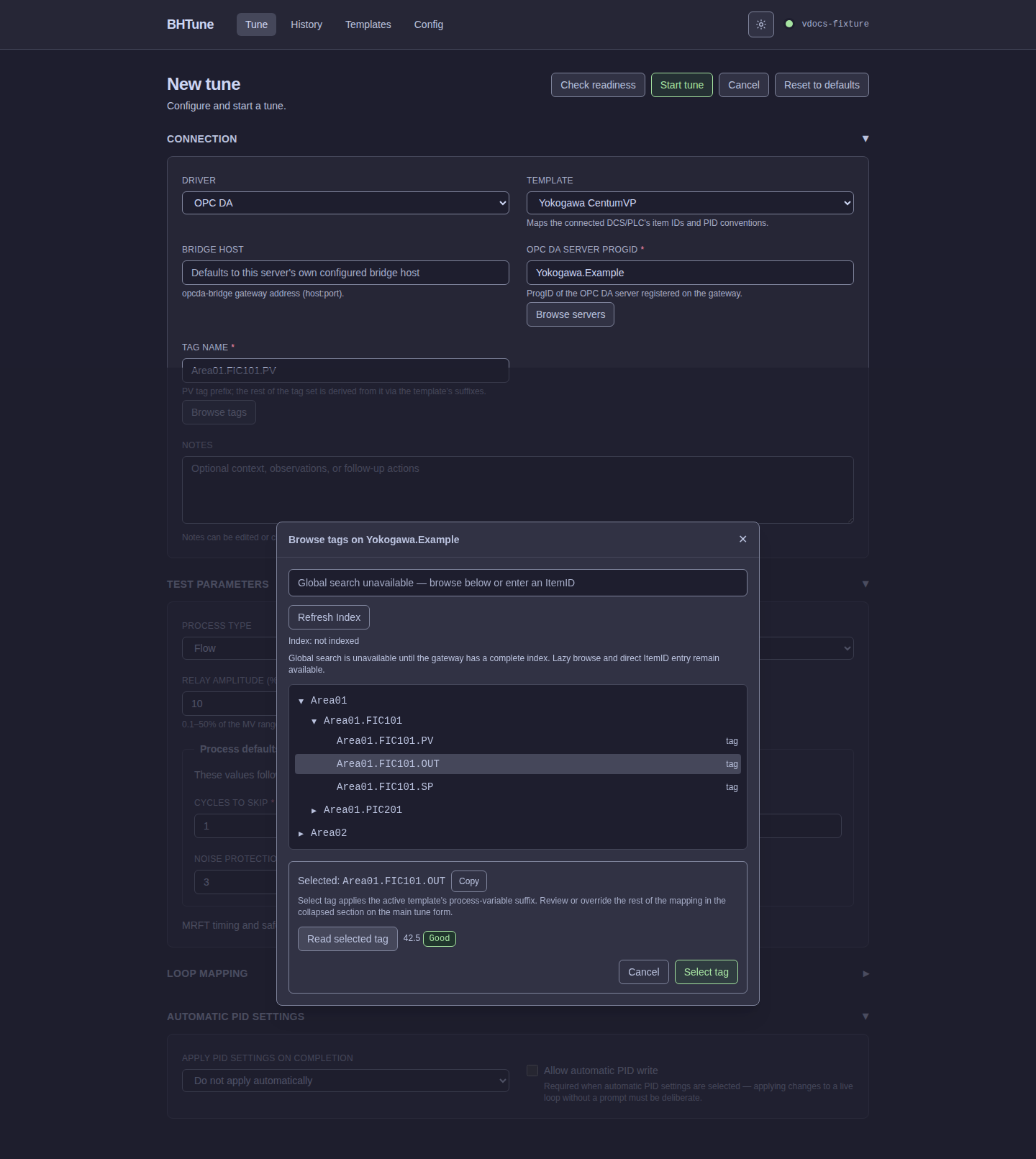
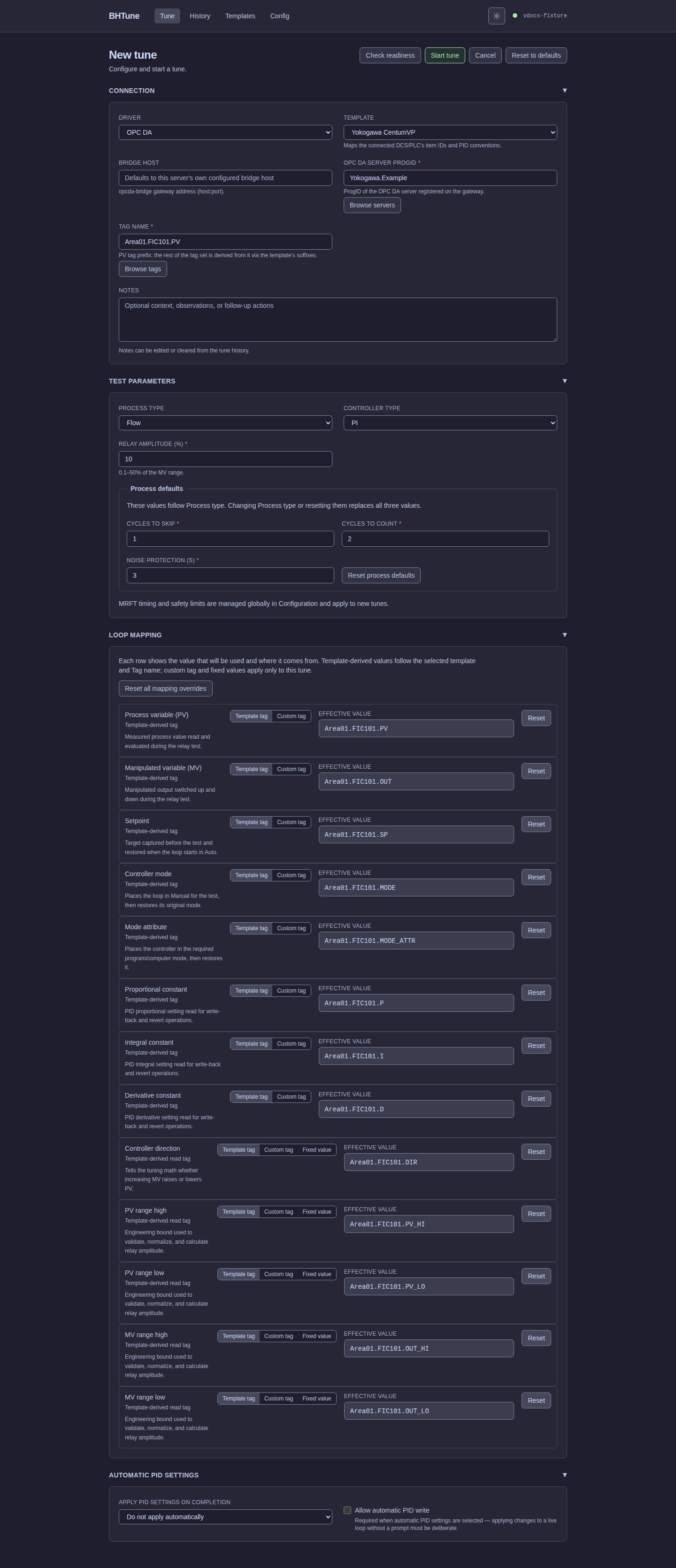
OUT item to the active template's PV item while preserving the path.| Field | Meaning |
|---|---|
process_variable_suffix | The PV tag's own suffix — required. |
manipulated_variable_suffix | The controller output/MV tag — required. |
setpoint_variable_suffix | The setpoint tag. |
controller_direction_suffix | The tag holding Direct/Reverse controller action. |
controller_mode_suffix | The tag holding the controller's Manual/Auto mode. |
mode_attribute_suffix | A second mode-related tag some DCS families require to permit external OPC writes (e.g. Honeywell Experion's MODEATTR, which must read "Program" first). |
upper_pv_range_suffix / lower_pv_range_suffix | The PV's engineering-unit range. |
upper_mv_range_suffix / lower_mv_range_suffix | The MV's engineering-unit range. |
proportional_constant_suffix / integral_constant_suffix / derivative_constant_suffix | The tags the calculated P/I/D constants are written back to. |
An empty string ("") means "this DCS has no such concept" — for example, Yokogawa
CentumVP has no separate mode-attribute tag, so mode_attribute_suffix = "". This is
different from leaving a field out entirely, which isn't valid for suffix fields (they're
all required strings, just possibly empty).
Raw tag values
| Field | Meaning |
|---|---|
mode_manual_value / mode_auto_value | The literal raw value controller_mode_suffix's tag holds for Manual and Auto, respectively (e.g. Yokogawa uses the literal text "MAN"/"AUT"; Schneider Modicon uses the literal text "false"/"true"). Required whenever controller_mode_suffix is non-empty. |
mode_attribute_program_value | The raw value mode_attribute_suffix's tag must hold for OPC writes to be accepted (e.g. Honeywell Experion's "2" for Program). Required whenever mode_attribute_suffix is non-empty; otherwise omit it. |
controller_action_direct_value | The raw value controller_direction_suffix's tag holds when the controller is Direct-acting (every built-in template uses the literal text "0", but this is vendor-specific, not assumed). |
All of these are strings, even when they look like booleans or numbers ("false",
"true", "0"). This matters: unquoted false/true/0 in TOML are boolean/integer
values, not the strings BHTune expects, and fail parsing. Always quote them.
Validation
Every template — built-in, from your catalog file, or hand-imported — is validated before it can be used:
namemust be non-empty (after trimming whitespace).process_variable_suffixandmanipulated_variable_suffixmust both be non-empty — without them, no tag set can be derived at all.- If
controller_mode_suffixis set, bothmode_manual_valueandmode_auto_valuemust be non-empty. - If
mode_attribute_suffixis set,mode_attribute_program_valuemust be present. pid_roundingmust explicitly contain a valid decimal-places or significant-digits policy.
A template that fails validation is rejected outright — at catalog-parse time for the
embedded/user catalog, and at bhtune template import time for a single-template JSON
file — rather than being accepted and only failing later, mid-tune, against a live loop.
Versions, not a "verified" flag
versions records the releases a mapping is known to apply to, framed as "current when
this mapping was authored," not as an exhaustively tested compatibility matrix. When a
newer release of a DCS/PLC changes its tag conventions, add a new [[template]] entry
with its own name and versions list — never edit an existing entry's suffixes in place.
Sites still running the older release depend on the mapping exactly as it's already
written; changing it out from under them is a silent regression for someone else.
There is deliberately no separate "verified" trust field. Catalog inclusion and schema acceptance are not an exhaustive hardware, firmware, access-permission, or control-performance guarantee. Review the cited mapping against the connected system and use read-only preflight before a live tune; report genuine mapping errors as bugs.
Contributing a template
- Start from an existing
[[template]]block incrates/bhtune-core/templates/builtin.tomlclosest to your control system, or export a template you've already built via the CLI (see below) as a starting point. - Fill in every suffix field for your DCS/PLC's PID block, its raw mode values, and a
versionsentry naming the release(s) you tested against. - Add a short
descriptionand asourceciting where the mapping came from (a manual, a function block reference, a field deployment). - Open a pull request against
builtin.toml. CI parses and validates the whole file on every push, so a malformed or incomplete contribution fails the build rather than merging silently broken. - If you'd rather keep a template private to your own site instead of (or before) contributing it upstream, put it in your own catalog file instead — see catalog loading for the auto-loaded path.
See CONTRIBUTING.md
for the repository's general contribution workflow (branching, commit style, the CLA).
CLI usage
# List every template (built-in, catalog, and user-imported)
bhtune template list

# Show one template's full field detail as JSON
bhtune template show "Yokogawa CentumVP"

# Export a template as a starting point -- JSON for a single-template copy,
# or TOML for a catalog-ready, PR-able [[template]] block
bhtune template export "Yokogawa CentumVP" ./my-template.json
bhtune template export "Yokogawa CentumVP" ./my-template.toml --format toml

# Import a template -- a single JSON template, or a multi-template TOML catalog
# (auto-detected from the file's content, not its extension)
bhtune template import ./my-template.json
bhtune template import ./site-catalog.toml

# Delete a template (refuses if a saved loop still references it)
bhtune template delete "My Custom Template"
Import format is detected from the content, not the extension: a leading JSON object selects
single-template JSON; otherwise the file is parsed as a TOML catalog. Parse failures are
reported without retrying an unrelated format. A JSON name collision fails the import.
A TOML catalog skips and reports existing names while adding new entries; it is not an
all-or-nothing catalog replacement. Imported entries have user origin and are not refreshed
when the import file changes. Use auto-loaded catalog ownership for source-managed definitions.